DRT Case Status Check Online: Steps and Details Needed
By Adv. Saravvanan R, Advocate · Reviewed by Advocate · Updated · 6 min read · Insolvency & Bankruptcy
Short answer
To do a DRT case status check online, open the official site drt.gov.in, choose the Debts Recovery Tribunal and its location, and search by case number and year, party name or diary number. The result shows the stage, next date and orders. Menus change, so verify the steps on the site.
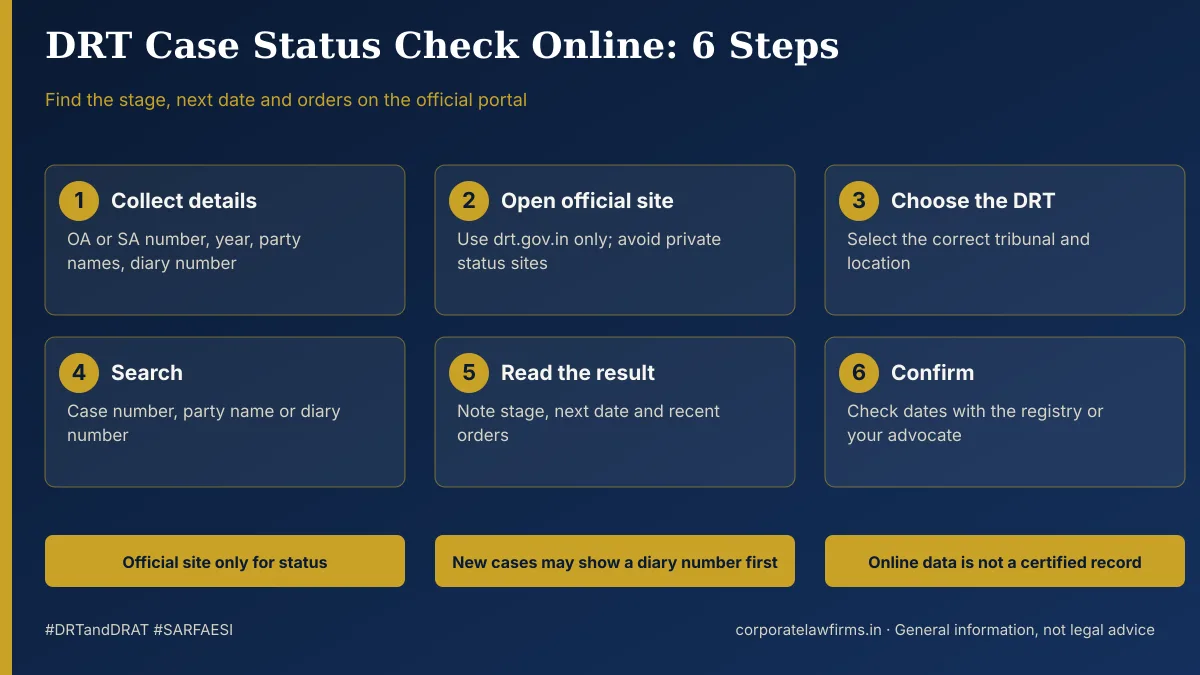
A DRT case status check online helps you see the stage of a recovery case or a SARFAESI application before a Debts Recovery Tribunal. You can usually find the next date, the stage and the latest orders. The starting point is the official website, drt.gov.in.
Please note that tribunal portals change their layout and links often. This guide gives the general method. Verify the current steps on the site before you rely on them.
Key Takeaways
- Use only the official DRT website for case status.
- Keep the case number, year and party names ready.
- A new application may show only under a diary number at first.
- Status and cause list are guides. Certified orders are the record.
- Missing data online does not mean the case does not exist.
What is a DRT case status check?
A Debts Recovery Tribunal hears recovery applications by banks and financial institutions. It also hears borrower challenges under the SARFAESI Act. A status check shows the progress of such a matter. To understand how DRT differs from the appellate forum, see DRT vs DRAT.
What details do you need?
- Name and location of the DRT (for example, Chennai or Coimbatore).
- Original Application (OA) number and year, or the SARFAESI Application (SA) number and year.
- Names of the applicant bank and the defendant or borrower.
- Diary or filing number, if the case is new.
- Any interim application numbers, if you track those.
How do you check DRT case status online?
- Open drt.gov.in, the official site.
- Find the case status or case search section.
- Select the tribunal and its location.
- Choose the search type: case number, party name or diary number.
- Enter the details and the captcha, if asked.
- Open the matching record to read the stage, next date and orders.
Some matters may also be reachable through eCourts. Do not assume that every tribunal case appears there. The DRT site tells you what it supports today.
What does the result tell you?
| Field | Meaning |
|---|---|
| Case type and number | OA for a recovery application, SA for a SARFAESI challenge, and so on |
| Parties | Bank or financial institution and the borrower side |
| Stage | Notice, reply, evidence, arguments or orders |
| Next date | Next listing, which may change |
| Orders | Interim or final orders, where uploaded |
If you are the borrower and the bank has taken action under the SARFAESI Act, read SARFAESI Section 17 appeal to DRT for the time limit and remedies. The limit is short, so do not wait for the portal to show the case.
Can you check the DRT cause list?
The tribunal website has carried daily listings. They show which matters are called that day and before which bench. Availability and format change, so check on the day. Your advocate can also confirm the listing with the registry.
What if you cannot find the case?
- The case may be new and still unnumbered.
- The year or type may be wrong, for example OA instead of SA.
- A party name may be spelt differently. Try a short part of it.
- You may have chosen the wrong DRT location.
- Data entry may be pending. Ask the registry.
Do not take a missing entry as proof that no case exists. Notices sent by post or email, and orders you hold, remain valid.
How does this link to recovery work?
Many borrowers first see a bank notice and then a DRT notice. A pre-suit demand is often a legal notice. Read legal notice for recovery of money from a company for that stage. For the tribunal side, see DRT solutions for corporate debt recovery.
If the DRT has passed an order and you are aggrieved, the next forum is the Appellate Tribunal. Its status can be tracked as in DRAT case status check. The wider subject is covered in insolvency, bankruptcy and debt recovery.
How do you read orders and next steps?
An order shown online is only a summary. Ask the registry for a certified copy before you act. Check whether the order sets a date for reply, evidence or payment, and note that date at once.
If you are a defendant, a notice from the tribunal usually names the date of first appearance. Missing it can lead to an order in your absence. Appear through an advocate or in person, and ask for time to file the reply if you need it.
If you are the bank, track the stage of service of notice, the filing of replies and the date for evidence. Each stage has its own timeline under the tribunal rules, which can change, so confirm them on the official site.
Common mistakes
- Using unofficial websites or apps for status.
- Confusing the OA number with the SA number.
- Relying on the next date shown without confirmation.
- Missing a reply date because the case did not appear online.
- Not collecting certified copies of orders.
- Assuming the online order text is the final signed order.
Documents and details required
- Notice or summons received from the tribunal.
- Copy of the application or SARFAESI notice.
- Acknowledgement of filing, if you are the applicant.
- Authority letter or vakalatnama for anyone checking on your behalf.
- Earlier orders in the matter.
What should you do next?
Write down the case number, bench, stage and next date. Set reminders. If the case shows an order against you, get a certified copy and check the appeal time limits at once. The rules, forms and portal features change from time to time, so check the official site each time.
For general information on your matter, you may contact the firm.
This article is general information, not legal advice. Reading it does not create an advocate-client relationship.
Frequently Asked Questions
How do I check DRT case status online?
Which number should I use for a new SARFAESI application?
Can I see the cause list online?
Is the online result enough to act on?
Topics: DRT & DRATSARFAESI
Related reading
- DRAT Case Status Check: How to Track an Appeal Online
- DRT vs DRAT: Key Differences in Powers and Appeals
- SARFAESI Section 17 Appeal to DRT: 45 Days, Remedies
- DRT Debt Recovery: How Debt Recovery Tribunals Work
- Legal Notice for Recovery of Money From a Company: Guide
- DRAT Chennai Location and Jurisdiction: What to Verify
This article is general information, not legal advice. Reading it does not create an advocate-client relationship. Read the disclaimer. Official sources: India Code, Bar Council of India.